Stripping KiezelPay (and other network calls) from Pebble Watch Faces
How to modify Pebble watch faces to your heart’s content
- Pebble Watch Face Architecture
- Modifying Pebble JS
- KiezelPay Watch Faces
- Failed Attempts
- Debugging Pebble Apps
- KiezelPay Status Verification
- Patching Pebble Binary
- Conclusion
⚠️ This post is for educational purposes only. I encourage you to support the creators of great watch faces. All faces used here were paid for in full before stripping payment verification. Following the steps here may violate usage agreements and could be unlawful in your jurisdiction.
This week I got my first Pebble watch in the mail after pre-ordering 15 months ago!
So far I’m extremely impressed with the quality and openness of the hardware and software. If you’re looking for a basic smartwatch with multi-day battery life, then I can wholeheartedly recommend the Pebble Time 2.
The one thing that caused me to raise an eyebrow was seeing that many of the watch faces call out to third parties for things like weather and payment info. Watch face scripts can send information like my location to arbitrary web resources along with a unique device and account identifier.
Visibility and tooling around network calls in the app itself would be nice to have, but for now I’ve resorted to stripping out the network calls myself thanks to how easy Pebble makes it to modify watch faces. The payment service most watch faces use, KiezelPay, gave me more trouble than I was expecting!
Pebble Watch Face Architecture
There are two components to most watch faces:
- C code that compiles down to a binary that runs on the watch hardware
- JavaScript that runs on the connected mobile device
Only the mobile device JS is able to make network calls.
This diagram from the Pebble developer docs illustrates how the components communicate:
┌─────────────┐          ┌──────────────────┐          ┌──────────────┐
│   Watch     │          │  Phone (PKJS)    │          │   Internet   │
│             │          │                  │          │              │
│  C code   ──┼── msg ──>│  index.js      ──┼── HTTP ─>│  API server  │
│             │          │                  │          │              │
│  <── msg ───┼──────────┤  <── response ───┼──────────┤              │
│             │          │                  │          │              │
│  AppMessage │          │  geolocation     │          │              │
│  request  ──┼── msg ──>│  → GPS lookup    │          │              │
│  <── msg ───┼──────────┤  → sends coords  │          │              │
└─────────────┘          └──────────────────┘          └──────────────┘
Let’s take a look at my current watch face Weather Land:
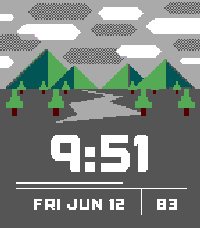
The app store links to a Download PBW button that lets us download the watch face bundle directly. A .pbw file is just a ZIP archive, so we can extract and view its contents:
unzip 4.0.pbw
Archive:  4.0.pbw
 extracting: appinfo.json
 extracting: pebble-js-app.js
 extracting: chalk/pebble-app.bin
 extracting: chalk/app_resources.pbpack
 extracting: chalk/manifest.json
 extracting: basalt/pebble-app.bin
 extracting: basalt/app_resources.pbpack
 extracting: basalt/manifest.json
 extracting: aplite/pebble-app.bin
 extracting: aplite/app_resources.pbpack
 extracting: aplite/manifest.json
appinfo.json- Metadata about the application including name, UUID, resources, capabilities, and target platformspebble-js-app.js- Phone-side script that handles fetching network resources and communicating weather data back to the watchchalk/,basalt/,aplite/- Each Pebble platform has its own name. See https://developer.rebble.io/guides/tools-and-resources/hardware-information/ for the list of platforms and their differencespebble-app.bin- The watch face written in C compiles down to this binary. It’s a custom executable format for Pebble watches, starting with magic headerPBLAapp_resources.pbpack- Resource bundle that contains fonts and imagesmanifest.json- Timestamps, checksums, and sizes of the resource pack and pebble app binary
Modifying Pebble JS
Let’s open up the pebble-js-app.js file for the Weather Land application and see how it works!
It’s a simple script at just 200 lines and handles:
- Logic to choose which background to display based on current wind, time, and temperature
- Network call to
api.openweathermap.orgwith latitude/longitude - Network call to
api.openweathermap.orgwith hardcoded location - Configuration using
reno.watch/pebble/settings.html
I’ve turned off precise location for the Pebble app and am okay with this app fetching my approximate location for the purposes of updating weather icons.
It’s a small complaint, but I’d really prefer the settings page to not be hosted externally and just live all within the app itself. I’m also not a fan of my unique account identifier being sent to the third party settings page.
Pebble.addEventListener("showConfiguration", function (e) {
  var uri =
    "https://reno.watch/pebble/settings.html?" +
    "use_gps=" +
    encodeURIComponent(options.use_gps) +
    "&location=" +
    encodeURIComponent(options.location) +
    "&apikey=" +
    encodeURIComponent(options.apikey) +
    "&units=" +
    encodeURIComponent(options.units) +
    "&invert_color=" +
    encodeURIComponent(options.invert_color) +
    "&account_token=" +
    encodeURIComponent(Pebble.getAccountToken());
  //console.log('showing configuration at uri: ' + uri);

  Pebble.openURL(uri);
});
Pebble.getAccountToken() is documented at https://developer.rebble.io/docs/pebblekit-js/Pebble/:
Pebble.getAccountToken()Returns a unique account token that is associated with the Pebble account of the current user.
Returns
A string that is guaranteed to be identical across devices if the user owns several Pebble or several mobile devices. From the developer’s perspective, the account token of a user is identical across platforms and across all the developer’s watchapps. If the user is not logged in, this function will return an empty string (‘’).
To get the app in a state I’m comfortable with, I’ll hardcode my desired settings and remove the call to the remote settings page. Pebble does offer a native, local configuration service Clay that could be used to keep the settings menu on-device, but I will leave that as an exercise to the reader.
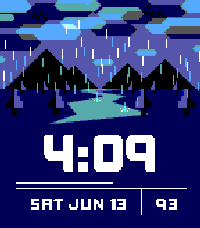
To prove that our change actually takes effect, let’s also change the weather to always show rain, the weather I hope for every day.
diff -U 3 pebble-js-app.js.bak pebble-js-app.js
--- pebble-js-app.js.bak        2021-04-28 21:39:46
+++ pebble-js-app.js    2026-06-13 15:51:30
@@ -25,6 +25,8 @@
 var NA = 13;

 function getIcon(id, dayBool, temp, wind) {
+  return RAIN;
+
   var category = id[0];

   switch (category) {
@@ -162,16 +164,15 @@
 }

 Pebble.addEventListener('showConfiguration', function (e) {
-  var uri = 'https://reno.watch/pebble/settings.html?' +
-    'use_gps=' + encodeURIComponent(options.use_gps) +
-    '&location=' + encodeURIComponent(options.location) +
-    '&apikey=' + encodeURIComponent(options.apikey) +
-    '&units=' + encodeURIComponent(options.units) +
-    '&invert_color=' + encodeURIComponent(options.invert_color) +
-    '&account_token=' + encodeURIComponent(Pebble.getAccountToken());
-  //console.log('showing configuration at uri: ' + uri);
+  // var uri = 'https://reno.watch/pebble/settings.html?' +
+  //   'use_gps=' + encodeURIComponent(options.use_gps) +
+  //   '&location=' + encodeURIComponent(options.location) +
+  //   '&apikey=' + encodeURIComponent(options.apikey) +
+  //   '&units=' + encodeURIComponent(options.units) +
+  //   '&invert_color=' + encodeURIComponent(options.invert_color) +
+  console.log('skipping configuration request');

-  Pebble.openURL(uri);
+  // Pebble.openURL(uri);
 });

 Pebble.addEventListener('webviewclosed', function (e) {
Now we can zip up the files again and load the app on our device!
zip -r weather_land_patched.pbw appinfo.json pebble-js-app.js aplite basalt chalk
  adding: appinfo.json (deflated 88%)
  adding: pebble-js-app.js (deflated 69%)
  adding: aplite/ (stored 0%)
  adding: aplite/pebble-app.bin (deflated 34%)
  adding: aplite/app_resources.pbpack (deflated 81%)
  adding: aplite/manifest.json (deflated 42%)
  adding: basalt/ (stored 0%)
  adding: basalt/pebble-app.bin (deflated 34%)
  adding: basalt/app_resources.pbpack (deflated 23%)
  adding: basalt/manifest.json (deflated 42%)
  adding: chalk/ (stored 0%)
  adding: chalk/pebble-app.bin (deflated 34%)
  adding: chalk/app_resources.pbpack (deflated 19%)
  adding: chalk/manifest.json (deflated 42%)
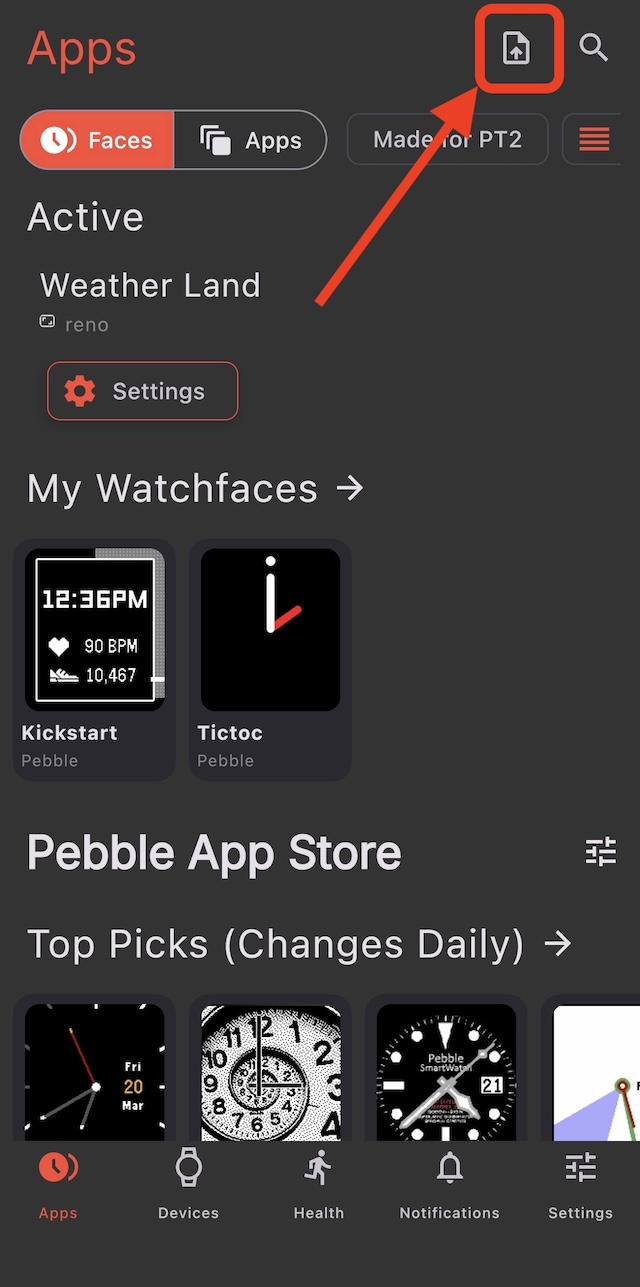
Share the .pbw to your mobile device and then sideload:
The face should start automatically and now shows rain!
KiezelPay Watch Faces
Okay the Weather Land example was a bit silly, let’s go through an example of something I actually care about: stripping network calls that check payment status. Forgive me, but I won’t be linking to a real watch face for this so I avoid singling out any app. The principles here should apply to all KiezelPay apps.
KiezelPay is the de facto payment handler for Pebble watch faces. It takes care of free trials, payment processing, and account recovery for a 27% fee at time of writing. My understanding is that the maintainer is pretty involved in the Pebble community and also offers the service for Garmin and Fitbit applications.
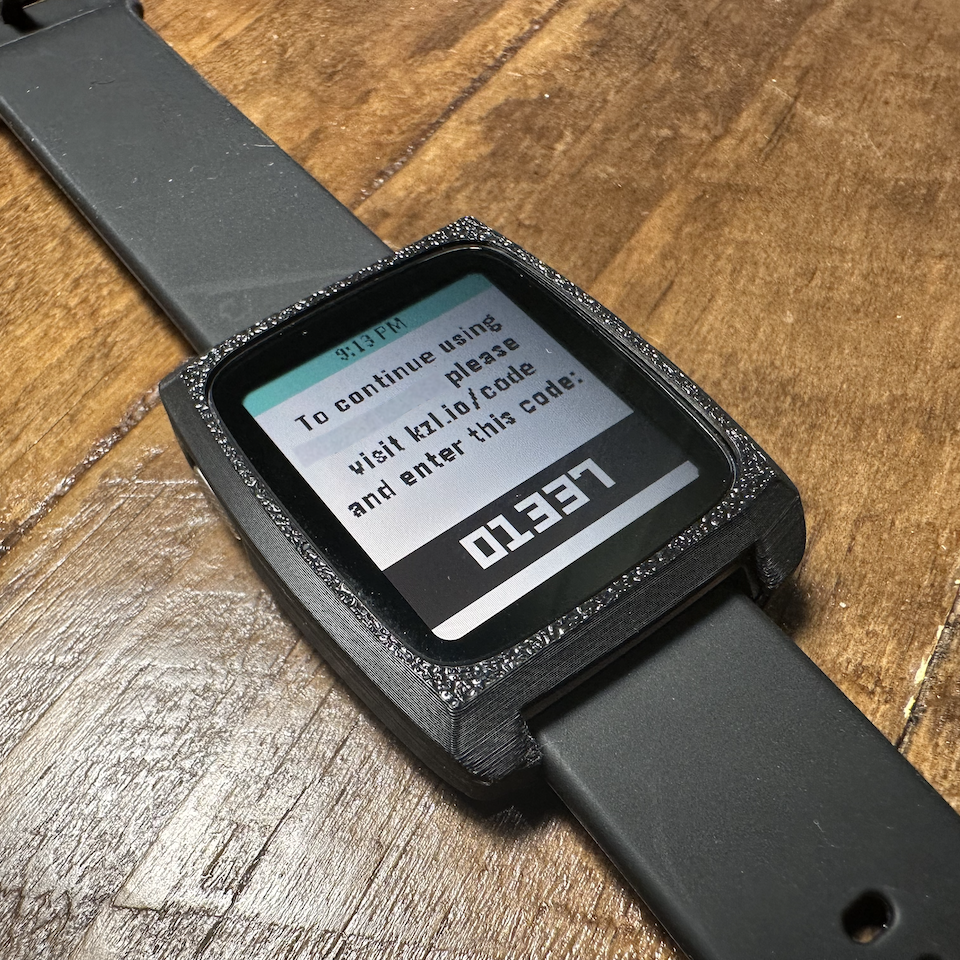
When you download a watch face from the Pebble store, after a trial period, you will get a notification from the app that looks like this (name of the face and my code redacted):
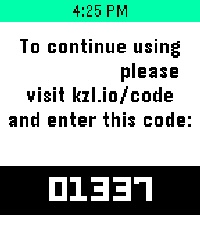
In every paid app I’ve seen, the pebble-js-app.js contains a section that calls out to www.kiezelpay.com with parameters that identify the device and account:
https://www.kiezelpay.com/api/v1/status?appid=123456&devicetoken=deadbeef&rand=15124&accounttoken=0123456789abcdef0123456789abcdef&platform=basalt&flags=9 HTTP/1.1
The KiezelPay service responds with a status and status-dependent information about trial status, purchase codes, etc.:
{
  "status": "unlicensed",
  "paymentCode": 1337,
  "purchaseStatus": "waitForUser",
  "checksum": "54d626e08c1c802b305dad30b7e54a82f102390cc92c7d4db112048935236e9c"
}
Again, I am not opposed to paying for watch faces but I would prefer that once paid for, the app does not reach out to any third party service to verify this status with my unique device and account identifiers. So, let’s figure out how to remove it!
Failed Attempts
Removing /api/v1/status call
Let’s start with the most basic test: removing the network call. The watch face requests status updates from the script running on the phone. Every time this happens we can just ignore it and see what happens.
As an example, an app might listen for status requests from the Pebble app binary like this:
Pebble.addEventListener("appmessage", function (e) {
  if (e.payload.KIEZELPAY_STATUS_MESSAGE > 0) {
    handleKiezelPayAppMessage(e);
  }
});
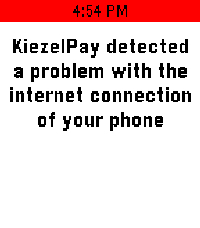
If we comment out this handler and reload the app it might work for a bit, but in most cases the app will throw a fit after some timeout period:
Spoofing Response
The error above suggests that the watch requires a response, so let’s forge a response. Based on some hints in various apps, we can try returning a fake licensed response.
{
  "status": "licensed",
  "validityPeriodInDays": 9999,
  "checksum": "54d626e08c1c802b305dad30b7e54a82f102390cc92c7d4db112048935236e9c"
}
Wherever the app makes the network request, replace the network call with this static response. The checksum here is just a random SHA-256 that likely won’t pass validation if it exists, but we can see if we at least get a different error message.
And we do!
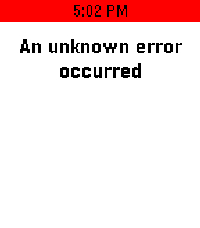
Okay now we have a good lead that something in the binary is validating a checksum, but we don’t know how the checksum is generated. At this point I sought both better debugging strategies and more info about how a developer sets up KiezelPay to see if it would help me identify what’s going on here.
Debugging Pebble Apps
The Pebble SDK allows for emulating Pebble devices and connecting to hardware to view logs. I opted for the emulator when debugging my apps.
Using the .pbw from the previous forged response test after installing the SDK we get the same error in the emulated window but a dump of what looks like the client spamming status requests because it encounters errors:
...
DEBUG:pypkjs.javascript.console:pebble-js-app.js:332 KiezelPay - kiezelPayOnAppMessage() called
DEBUG:pypkjs.javascript.console:pebble-js-app.js:332 https://www.kiezelpay.com/api/v1/status?appid=123456&devicetoken=deadbeef&rand=15124&accounttoken=0123456789abcdef0123456789abcdef&platform=basalt&flags=9
DEBUG:pypkjs.javascript.console:pebble-js-app.js:332 KiezelPay - Status response: {"status":"licensed","validityPeriodInDays": 9999,"checksum": "54d626e08c1c802b305dad30b7e54a82f102390cc92c7d4db112048935236e9c"}
DEBUG:pypkjs.javascript.console:pebble-js-app.js:332 KiezelPay - Watch status msg: {"KIEZELPAY_STATUS_RESULT":2,"KIEZELPAY_STATUS_TRIAL_DURATION":0,"KIEZELPAY_PURCHASE_CODE":0,"KIEZELPAY_PURCHASE_STATUS":0,"KIEZELPAY_STATUS_VALIDITY_PERIOD":9999,"KIEZELPAY_STATUS_CHECKSUM":[84,214,38,224,140,28,128,43,48,93,173,48,183,229,74,130,241,2,57,12,201,44,125,77,177,18,4,137,53,35,110,156]}
DEBUG:libpebble2.communication:-> AppMessage(command=None, transaction_id=236, data=AppMessagePush(uuid=c4c60c62-2c22-4ad7-aef4-cad9481da580, count=None, dictionary=[AppMessageTuple(key=10034, type=3, length=None, data=02000000), AppMessageTuple(key=10035, type=3, length=None, data=00000000), AppMessageTuple(key=10028, type=3, length=None, data=00000000), AppMessageTuple(key=10029, type=3, length=None, data=00000000), AppMessageTuple(key=10036, type=3, length=None, data=0f270000), AppMessageTuple(key=10033, type=0, length=None, data=54d626e08c1c802b305dad30b7e54a82f1...)]))
...
Unfortunately there are no errors from the watch binary that tell us why the response failed. At the very least this confirms that we’re sending what looks like a valid response to the watch and allows us to iterate faster.
KiezelPay Status Verification
I signed up for a developer account with KiezelPay to see if I could learn more about how the checksum works.
In the developer dashboard there is an option to create a new “product” with fields including name, description, and price. When a product is created, KiezelPay generates a bundle that includes .c files containing a unique checksum verification function!
#define KP_GENERATED_MAJOR 2

#define KIEZELPAY_APPID 12345678

#if KIEZELPAY_LOW_MEMORY_MODE == 0
static uint8_t kiezelpay_secret[16] = {14, 8, 7, 19, 100, 237, 68, 113, 221, 58, 99, 1, 11, 213, 47, 224};
#else
static uint32_t kiezelpay_secret = 1243866482;
#endif

#include <kiezelpay-core/kiezelpay-core.h>


static bool kiezelpay_validate_msg(kiezelpay_msg_data *msg) {
	LOG("%s", __func__);
	//before checking the hash, do some sanity checks
	#if KIEZELPAY_LOW_MEMORY_MODE == 0
	bool valid_format = (msg != NULL && msg->checksum != NULL);
	#else
	bool valid_format = (msg != NULL && msg->checksum != 0);
	#endif
	if (!valid_format) {
		return false;
	}

	#if KIEZELPAY_LOW_MEMORY_MODE == 0
	//prepare sha-256 context
	SHA256_CTX ctx_msg_check;
	sha256_init(&ctx_msg_check);
	uint32_t int_for_bytes;
	if (msg->status == 0) {          //unlicensed
	int_for_bytes = msg->purchase_code;
	sha256_update(&ctx_msg_check, (uint8_t*)&int_for_bytes + 3, 1);
	}
	int_for_bytes = kiezelpay_get_status_flags();
	sha256_update(&ctx_msg_check, (uint8_t*)&int_for_bytes + 3, 1);
	sha256_update(&ctx_msg_check, kiezelpay_secret + 11, 1);
	sha256_update(&ctx_msg_check, (uint8_t*)&kiezelpay_msg_random + 0, 1);
	sha256_update(&ctx_msg_check, (uint8_t*)&kiezelpay_msg_random + 1, 1);
	#if KIEZELPAY_DISABLE_TIME_TRIAL == 0
	if (msg->status == 1) {      //trial
	sha256_update(&ctx_msg_check, (uint8_t*)&(msg->trial_duration) + 3, 1);
	}
	#endif
	sha256_update(&ctx_msg_check, kiezelpay_secret + 7, 1);
	sha256_update(&ctx_msg_check, kiezelpay_secret + 8, 1);
	sha256_update(&ctx_msg_check, (uint8_t*)&(kiezelpay_current_state.device_id) + 2, 1);
	sha256_update(&ctx_msg_check, kiezelpay_secret + 6, 1);
	sha256_update(&ctx_msg_check, kiezelpay_secret + 1, 1);
	sha256_update(&ctx_msg_check, (uint8_t*)&(kiezelpay_current_state.device_id) + 1, 1);
	sha256_update(&ctx_msg_check, kiezelpay_secret + 4, 1);
	sha256_update(&ctx_msg_check, kiezelpay_secret + 5, 1);
	int_for_bytes = kiezelpay_get_status_flags();
	sha256_update(&ctx_msg_check, (uint8_t*)&int_for_bytes + 0, 1);
	#if KIEZELPAY_DISABLE_TIME_TRIAL == 0
	if (msg->status == 1) {      //trial
	sha256_update(&ctx_msg_check, (uint8_t*)&(msg->trial_duration) + 2, 1);
	}
	#endif
	int_for_bytes = kiezelpay_get_status_flags();
	sha256_update(&ctx_msg_check, (uint8_t*)&int_for_bytes + 2, 1);
	sha256_update(&ctx_msg_check, kiezelpay_secret + 10, 1);
	sha256_update(&ctx_msg_check, kiezelpay_secret + 2, 1);
	sha256_update(&ctx_msg_check, kiezelpay_secret + 9, 1);
	sha256_update(&ctx_msg_check, kiezelpay_secret + 0, 1);
	#if KIEZELPAY_DISABLE_TIME_TRIAL == 0
	if (msg->status == 1) {      //trial
	sha256_update(&ctx_msg_check, (uint8_t*)&(msg->trial_duration) + 1, 1);
	}
	#endif
	sha256_update(&ctx_msg_check, (uint8_t*)&(kiezelpay_current_state.device_id) + 3, 1);
	sha256_update(&ctx_msg_check, kiezelpay_secret + 3, 1);
	sha256_update(&ctx_msg_check, kiezelpay_secret + 13, 1);
	int_for_bytes = kiezelpay_get_status_flags();
	sha256_update(&ctx_msg_check, (uint8_t*)&int_for_bytes + 1, 1);
	#if KIEZELPAY_DISABLE_TIME_TRIAL == 0
	if (msg->status == 1) {      //trial
	sha256_update(&ctx_msg_check, (uint8_t*)&(msg->trial_duration) + 0, 1);
	}
	#endif
	sha256_update(&ctx_msg_check, kiezelpay_secret + 12, 1);
	if (msg->status == 0) {          //unlicensed
	int_for_bytes = msg->purchase_code;
	sha256_update(&ctx_msg_check, (uint8_t*)&int_for_bytes + 1, 1);
	}
	if (msg->status == 1 || msg->status == 2) {      //trial or licensed
	sha256_update(&ctx_msg_check, (uint8_t*)&(msg->validity_period), 1);
	}
	if (msg->status == 0) {          //unlicensed
	int_for_bytes = msg->purchase_code;
	sha256_update(&ctx_msg_check, (uint8_t*)&int_for_bytes + 2, 1);
	}
	sha256_update(&ctx_msg_check, kiezelpay_secret + 14, 1);
	sha256_update(&ctx_msg_check, (uint8_t*)&(kiezelpay_current_state.device_id) + 0, 1);
	if (msg->status == 0) {          //unlicensed
	int_for_bytes = msg->purchase_code;
	sha256_update(&ctx_msg_check, (uint8_t*)&int_for_bytes + 0, 1);
	}
	sha256_update(&ctx_msg_check, kiezelpay_secret + 15, 1);
	int_for_bytes = msg->status;
	sha256_update(&ctx_msg_check, (uint8_t*)&int_for_bytes, 1);
	//calculate sha-256 hash
	uint8_t hash[SHA256_BLOCK_SIZE];
	sha256_final(&ctx_msg_check, hash);

	//compare this hash with the checksum returned by the server
	for (uint32_t i = 0; i < SHA256_BLOCK_SIZE; i++) {
		if (msg->checksum[i] != hash[i]) return false;
	}
	return true;
	#else
	uint32_t hash = ((kiezelpay_current_state.device_id + kiezelpay_secret) * 1788393421 + 40820) & 0x7fffffff;
	return hash == msg->checksum;
	#endif
}
We have a path forward! The verification here tells us how the checksum is recreated client side to ensure the status response from the server matches. There are many ways we could get around this, here are the two I considered, each with its own pros and cons:
1: Extract the key from the existing binary to be able to reproduce the checksums.
As I later learned by creating a second product in the KiezelPay developer portal, the offsets into the secret are also randomized, which can be annoying to extract. It also involves including a sha256 implementation that runs in the app’s JS.
I threw this at Opus 4.8 just for fun and it did successfully extract the secret from a couple of apps but got stuck extracting the offsets. The loop eventually hit my usage limits and I finished option #2 the old fashioned way before the limit renewed. I’m sure with a bit more time or better harnessing it would’ve been able to complete the task.
2: Patch the verification function to always return that the checksum is valid.
This one involves patching the binary itself which comes with its own complications (you’ll see), but is the same change in nearly all apps and only requires a spoofed “licensed” response from the JS app.
Patching Pebble Binary
As an occasional reverse engineering dabbler, I reached for Ghidra to decompile the Pebble binary.
If you’re not super with patching binaries, the high-level overview is that we can change the program by modifying the CPU instructions encoded in the binary itself. To identify which instructions to change, we can use a disassembler/decompiler like Ghidra to figure out exactly which instructions to change such that the behavior of the program is different without needing to recompile from the source code.
After creating a new Ghidra project, import the pebble-app.bin from the basalt/ directory. Basalt corresponds to the original Pebble Time and is what runs on my Pebble Time 2.
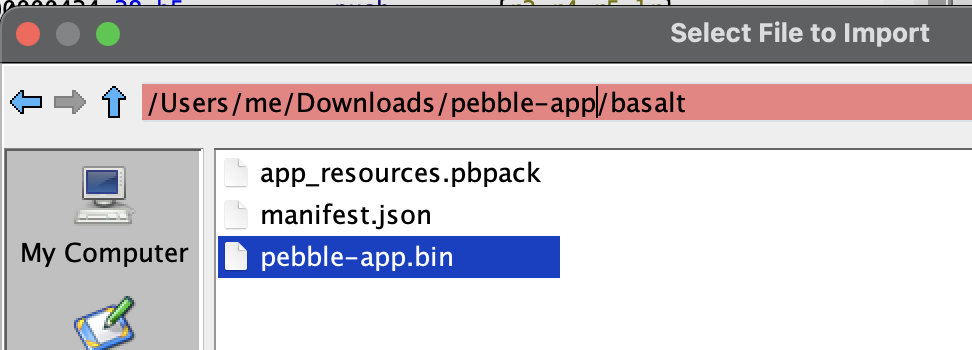
Pebble Basalt runs a Cortex-M4 processor, so select the appropriate architecture:
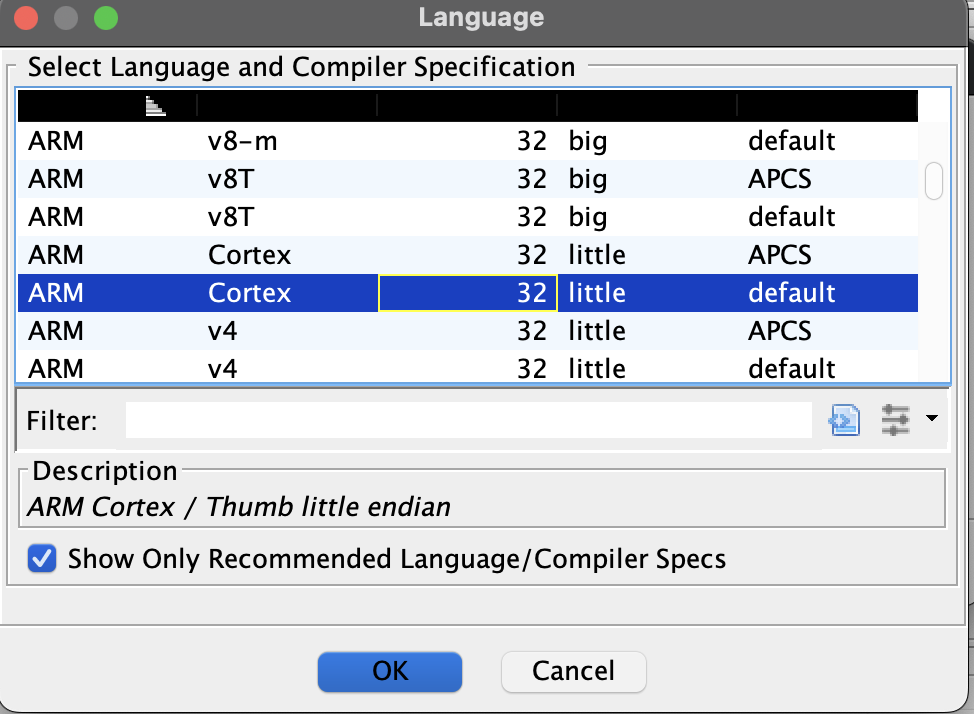
Then run Analysis to decompile.
Something I’ve always struggled with is finding or tracking logic in a decompiled binary. My strategy is usually to find some crib that I search for within the binary and then go from there.
There are a couple of cribs in the verification function we can look for:
%sstring in theLOG()function. I didn’t have any luck with this one, none of the%sstrings Ghidra found looked relevant.- The
sha256_updatefunction is called A LOT. If a function has 20+ references then there’s a good chance that’s our function.
This function has a suspicious number of references:
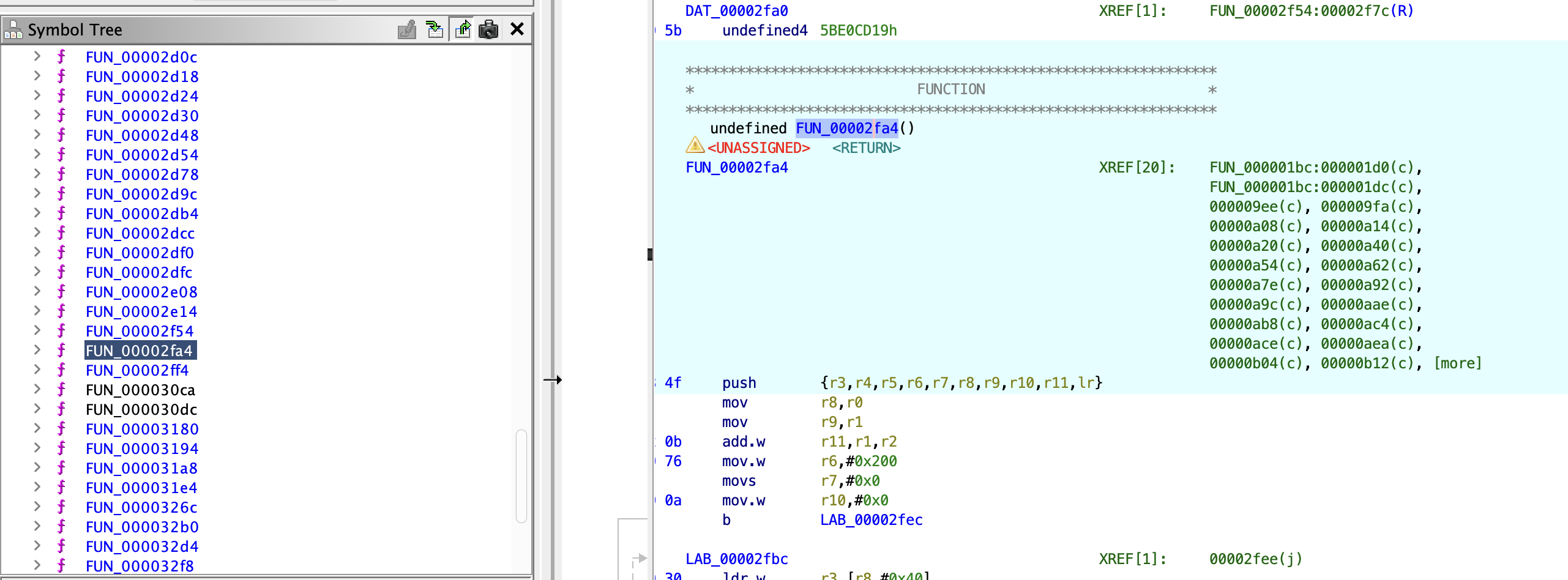
Right clicking on the function > References > Show References To… reveals what looks a lot like the update function we’re hunting down. Admittedly I counted the number of calls to the update function in both places to make sure they matched…
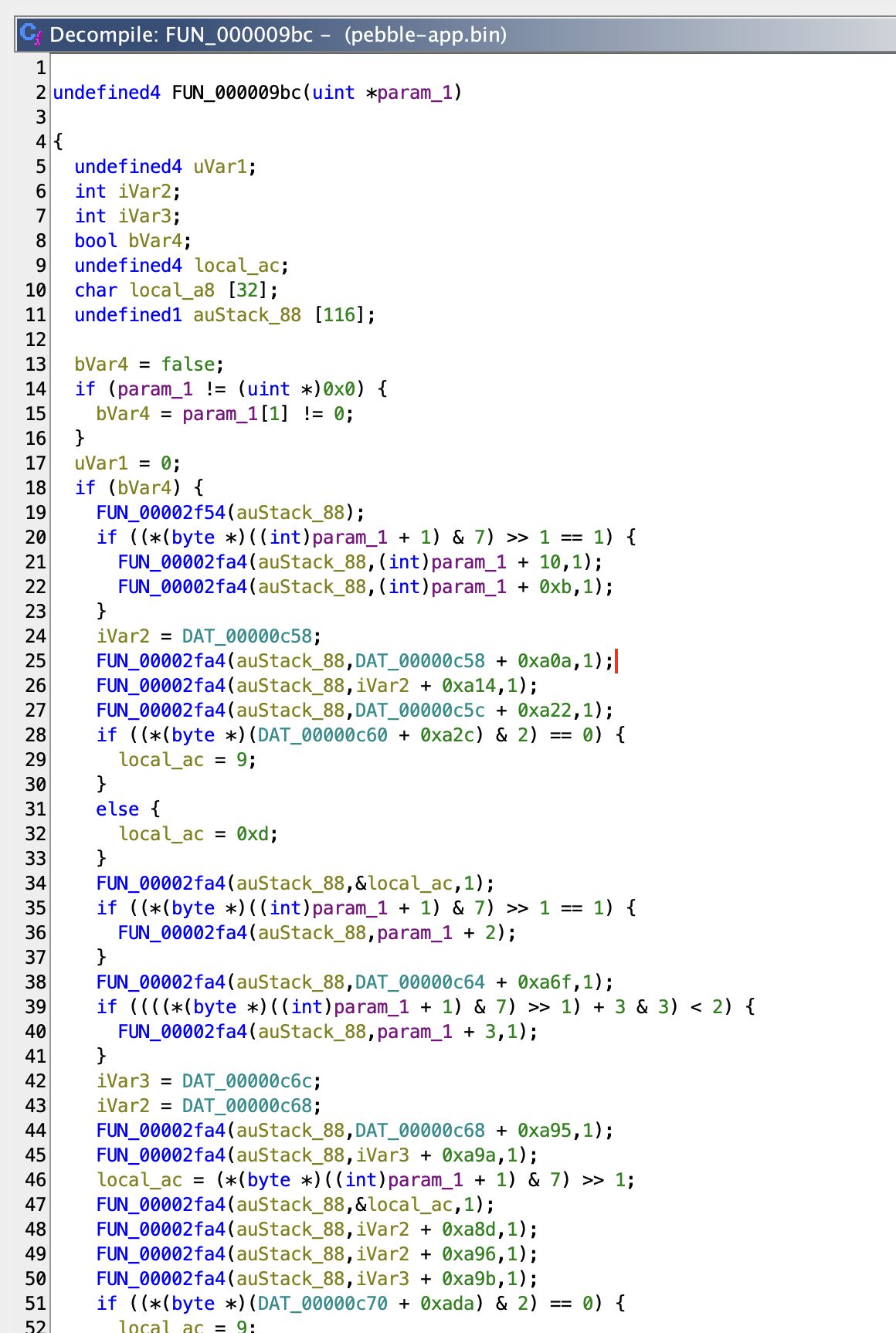
Now that we’ve found the verification function in the binary it’s straightforward to extract the secret and offsets OR to patch the binary. Up to you. I took the patching approach.
The very bottom of the function has the logic for validating that the client-side checksum matches the checksum response from the server. The goal is to make all checksum comparisons return true even if they don’t match, so we can make a change like this:
 //compare this hash with the checksum returned by the server
 for (uint32_t i = 0; i < SHA256_BLOCK_SIZE; i++) {
-    if (msg->checksum[i] != hash[i]) return false;
+    if (msg->checksum[i] != hash[i]) return true;
 }
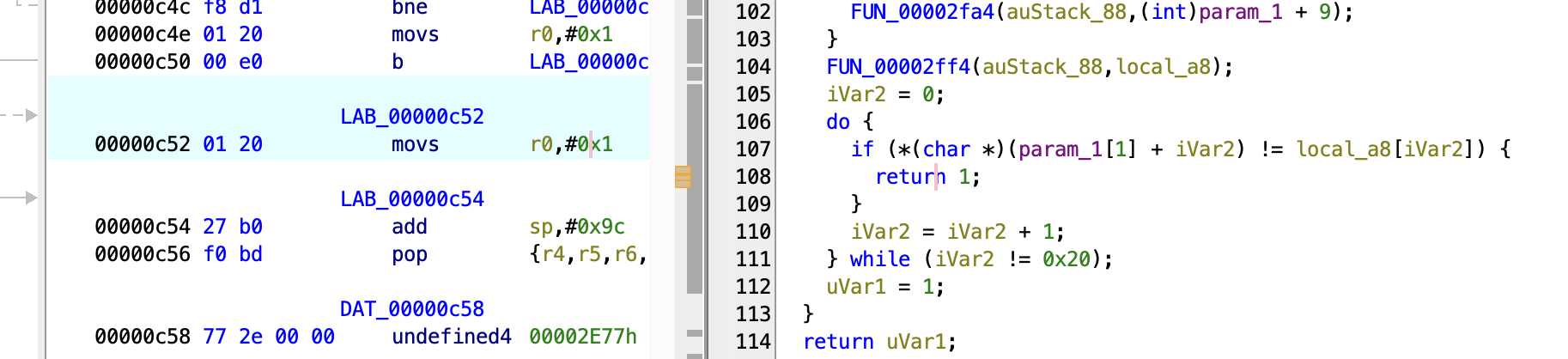
In the Ghidra decompilation the equivalent decompiled code looks like this, returning 0 when any element of the array does not match:
    do {
      if (*(char *)(param_1[1] + iVar2) != local_a8[iVar2]) {
        return 0;
      }
      iVar2 = iVar2 + 1;
    } while (iVar2 != 0x20);
We can click on the return 0 to jump to the instructions in the instruction view, then Right Click > Patch Instruction to change the movs r0, #0x0 to movs r0, #0x1. This will update the decompilation view to match our desired state:
Now we can hit File > Export Program to save the patched program and attempt to run the watch face again! Make sure you still have the forged API response in the JS so the watch face still gets a licensed response.
After zipping and sideloading the new .pbw… it doesn’t load! On my hardware it crashes back to the settings menu and reverts to the previously running watch face.
Trying with the emulator also crashes:
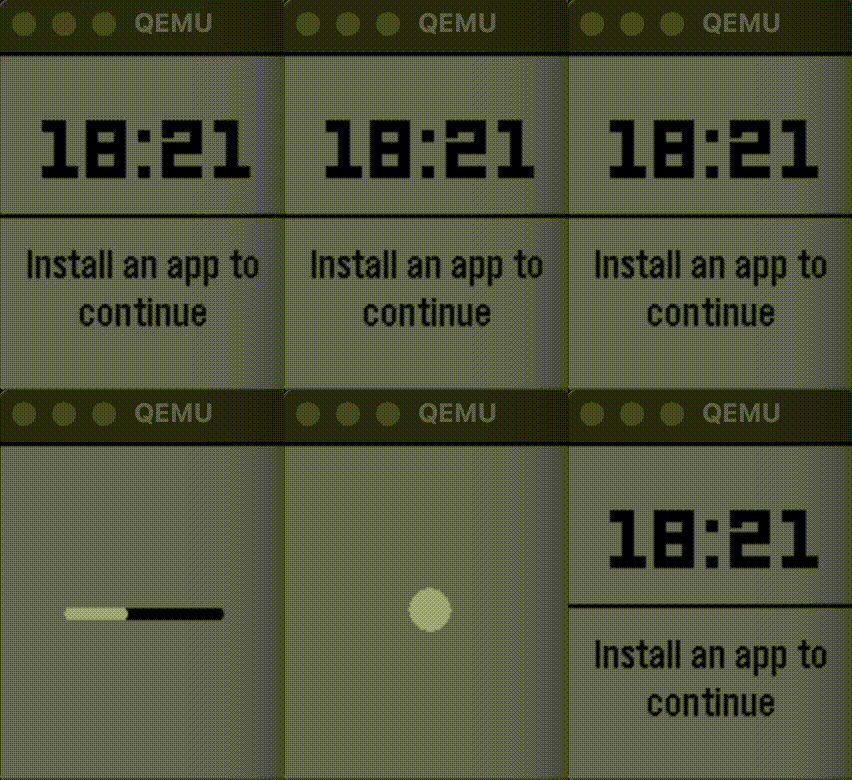
All we did was change a single instruction!
Patching Pebble Checksums
I didn’t see any useful crash logs in the emulator, but while searching around for how other people patch their Pebble apps I found https://github.com/cpfair/rockgarden. This library allows for patching the Pebble SDK functions.
It patches 2 CRCs, one for the manifest and one in the binary itself that I did not account for:
if os.path.exists(asset_path):
	bin_crc = stm32crc(asset_path)
	manifest_obj[manifest_key]["crc"] = bin_crc
	manifest_obj[manifest_key]["size"] = os.stat(asset_path).st_size
final_crc = crc32(mod_binary + main_binary)
logger.debug("Final CRC: %d" % final_crc)

self._write_value_at_offset(CRC_ADDR, "<L", final_crc)
I pulled in rockgarden to create a custom patcher that will build a new .pbw from the unpacked app in the current directory, fixing the CRC of both the manifest and the binary:
Now we can run repack.py to build a new .pbw and test that!
python3 repack.py
INFO: patching Aplite binary CRC
INFO: patching Basalt binary CRC
INFO: Patching Basalt binary
INFO: Main binary:
        Load size       3a30
        Virt size       3bf9
        Entry pt        21ac
        Jump tbl        b8
INFO: patching Chalk binary CRC
INFO: Patching Chalk binary
INFO: Main binary:
        Load size       3858
        Virt size       3a2e
        Entry pt        2170
        Jump tbl        b8
INFO: patching Diorite binary CRC
INFO: Patching Diorite binary
INFO: Main binary:
        Load size       3788
        Virt size       3951
        Entry pt        20a4
        Jump tbl        b8
INFO: patching Emery binary CRC
INFO: Adding file pebble-js-app.js.map to zip
INFO: Adding file appinfo.json to zip
INFO: Adding file pebble-js-app.js to zip
INFO: Adding file pebble-app.bin to zip
INFO: Adding file app_resources.pbpack to zip
INFO: Adding file manifest.json to zip
INFO: Adding file pebble-app.bin to zip
INFO: Adding file app_resources.pbpack to zip
INFO: Adding file manifest.json to zip
INFO: Adding file pebble-app.bin to zip
INFO: Adding file app_resources.pbpack to zip
INFO: Adding file manifest.json to zip
INFO: Adding file pebble-app.bin to zip
INFO: Adding file app_resources.pbpack to zip
INFO: Adding file manifest.json to zip
Success! This newly packed watch face with the corrected CRCs works in both the emulator and the hardware without any KiezelPay network callouts!
Conclusion
This experience highlights one of the biggest selling points of Pebble: complete ownership of hardware and software. Because sideloading has first-class support in the Pebble app it’s incredibly easy to customize watch faces and reupload them. Now I don’t have to worry about the watch faces I use regularly reaching out to third party services with my account and device identifiers.
To recap the process:
- Download the watch face
.pbwfrom the Pebble store - Unzip the bundle and identify what you want to change
- Change
pebble-js-app.jsto modify network calls and anything else that runs phone-side - Patch
pebble-app.binto modify the code that runs on the watch itself - Run
repack.pyto correct the checksums and repack the.pbw - Sideload on phone through the native Pebble app
Of course this level of ownership is a double-edged sword: having the ability to strip out the mechanism that enforces payment for software makes the Pebble ecosystem less attractive for creators depending on payment for their work. This has been a struggle since the beginning of computing and partially why we have things like closed platforms and DRM. My hope is that the tradeoff still favors openness and the incentives still align enough to keep platforms like Pebble appealing to creators and users.
